
- The decision to reinvest dividends is considered to be an important step on the path to building wealth. It allows you to take advantage of compound capital growth, accelerating the achievement of financial independence.
- Enabling automatic dividend reinvestment saves investors time and offers several additional benefits.
- The broker Fidelity provides its clients with the ability to navigate their Dividend Reinvestment Plan (DRIP) settings quickly and flexibly.
In this article, we will explain how to set-up dividend reinvestment with Fidelity. This can be done either via your personal account on the website or through the Fidelity app for mobile investing.
Table of Contents
What Is Dividend Reinvestment?
Dividend reinvestment is an investment strategy in which a person uses dividend income to purchase additional shares. This allows compound growth of capital and maximizes returns over time.
The advantages of consistent reinvestment include:
- an increase in the investor’s number of shares;
- growth in the cash flow generated by assets;
- a more favourable average cost per position.
Enrolling in a DRIP ensures automatic reinvestment of received dividends. This type of service is provided by most brokers and individual companies.
The primary purpose of a DRIP is to save investors time. For example, imagine a person owns 20-40 stocks, each of which pays quarterly dividends. In this scenario, DRIPs can save investors dozens of hours per year by eliminating the need for manual transactions.
Depending on the program’s terms, investors can benefit from discounts or the ability to purchase fractional shares. The latter boosts the efficiency of reinvestment. This allows an individual to utilize every cent of dividend income earned by their assets.
Why Should You Reinvest Dividends?
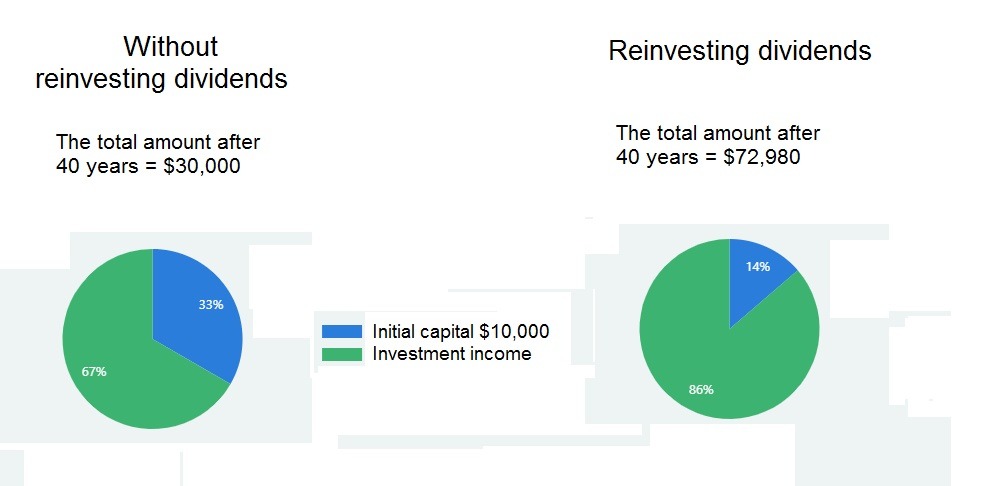
Dividend reinvestment is a key factor in long-term investing and wealth building strategies. This stage ensures compound growth of capital. Dividends reinvested in new assets begin to generate additional earnings. Consequently, each year, the long-term investor can buy more shares using the dividends received.
Thanks to the decision to reinvest their dividends over several decades, investors have seen growth in both asset value and passive income. The table below compares the outcomes for an initial investment of $10,000, assuming quarterly reinvestment and an average annual return of 5%.
Also, using dividends to purchase additional shares achieves dollar-cost averaging. This is because the investor continues to buy assets during bear market periods.
The advantage of a strategy in which an investor holds shares for a long time in order to receive regular dividends is tax efficiency. This provides a legal opportunity to reduce the amount of tax paid. In most cases, such income is taxed at long-term capital gains rates. Income from active stock trading is taxed at ordinary rates.
Types of Dividend Reinvestment Plans
There are two types of automatic reinvestment plan. The first is a company DRIP. Most American companies supply this with their shareholders. The main advantage of this option is that it allows you to purchase additional discount shares. However, not all companies make this privilege available.
The main disadvantage is the requirement for direct enrollment in the company’s shareholder register. Investors who wish to hold shares in several companies must manage multiple accounts.
They will also need to study the terms and fees of each DRIP they enroll in. Some companies allow shareholders to invest their received payments in new shares commission-free. However, others may charge additional fees for account maintenance and related services.
With a brokerage DRIP, you can hold shares in different companies in a single account and reinvest them under uniform terms. One disadvantage of this option is the absence of share discounts. However, most brokers offset this by offering flexible programs, the ability to purchase fractional shares, and an absence of additional fees, among other benefits.
How to Reinvest Dividends Using the Fidelity App: Step-by-Step Guide
Below is a Fidelity app tutorial for mobile investing. This step-by-step guide will help beginner investors easily locate the dividend settings they need.
Before explaining how to set up automatic dividend reinvestment Fidelity, it is important to note that clients cannot make changes to IRA-BDAs and PAS accounts.
Download and Set Up the Fidelity App
The first task is to download the Fidelity app. This mobile brokerage is available on both iOS and Android devices. You can find it via the search bar in the App Store or Google Play, or by scanning the QR code on the Fidelity website.
The second stage in the guide on how to set up dividend reinvestment Fidelity is account setup. Fidelity offers a user-friendly interface for efficient investment management.
The app provides easy access to financial tools, and the ability to customize a dashboard for monitoring key portfolio metrics. It also offers a notification system and more.
Link Your Bank Account to the Fidelity App
If you already have an investment portfolio with the broker, you can skip this stage and proceed directly to stage five of the guide on how to do dividend reinvestment on Fidelity.
The third stage involves bank account linking. Financial integration simplifies fund transfers. Fidelity uses advanced encryption technology, ensuring fast, secure transactions between investors’ brokerage and bank accounts.
Select Investments for Dividend Reinvestment
The fourth stage is investment selection. There are many criteria for selecting dividend-paying stocks. The simplest of these is dividend yield. However, to make the best possible choice, it is necessary to consider additional factors:
- the dividend payout ratio;
- the length of the consecutive dividend growth streak;
- the company’s financial health, and others.
Investors are not limited to individual dividend-paying companies. Through Fidelity, you can purchase shares in funds that combine dozens or even hundreds of companies, all of which are selected based on key criteria.
This approach offers diversification even with limited capital. It also simplifies portfolio management, since investors do not need to evaluate the performance of numerous companies.
Set Up Automatic Dividend Reinvestment
The fifth stage is activating the automatic reinvestment function. This is a key stage in the guide on how to turn on dividend reinvestment Fidelity.
A DRIP setup is a key component of hands-off investing. Once the required parameters have been chosen, the app user does not need to do anything else. This saves time in the future and provides the benefit of commission-free reinvestment.
How to set up dividend reinvestment Fidelity step-by-step:
- Log in to the app with your username and password.
- Tap the ‘Accounts’ tab. Then select ‘Account Features’ from the top menu.
- Scroll down to ‘Brokerage and Trading’ and select the ‘Dividends and Capital Gains’ section.
- Tap the ‘Manage’ button. In the list of assets that appears, find the security or mutual fund for which you need to adjust the settings, then tap ‘Update’.
- On the next page, select ‘Reinvest in security’ and choose your preferred automatic reinvestment parameters from the options provided.
- Indicate whether the selected changes should apply to assets that are already in the account, or to stock purchases, transfers and deposits that will be made in future.
- Tap the ‘Update’ button. You will then be taken to a page where you need to confirm the changes.
Please note that Fidelity clients can choose different reinvestment parameters for dividends and capital gains for mutual funds. For securities, however, only general settings are available.
Another nuance to mention when answering how to set-up dividend reinvestment options to run automatically with Fidelity is the timing of making changes. For updated reinvestment instructions to apply to the next payment, they must be made before the record date.
Please note that the ‘Dividends and Capital Gains’ section is usually unavailable between 9.30pm and 10.30pm ET from Monday to Friday.
How to turn off dividend reinvestment Fidelity: Follow the same instructions, choosing the ‘Deposit to core account’ option in stage five.
Monitor and Manage Your Dividend Reinvestment
Even with automatic dividend reinvestment allowed, it is necessary to perform portfolio analysis and performance tracking. The Fidelity app offers easy-to-use dividend monitoring tools. These tools help you to assess the contribution of reinvestment to your overall wealth growth.
Maintaining the intended portfolio allocation is even more crucial in investment management. This requires rebalancing at least once a year.
The next important point is to regularly review the rationale for increasing positions in chosen assets. A stock’s dividend yield can decline for a variety of reasons. Therefore, the future prospects of securities added to the portfolio through automatic reinvestment must be periodically evaluated.
Benefits of Using the Fidelity App for Dividend Reinvestment
Fidelity app benefits:
- interface convenience and the simplicity of the guide on how to change dividend reinvestment Fidelity;
- cost-effectiveness, achieved through the absence of unnecessary fees and the option to purchase fractional shares;
- flexibility of reinvestment parameter settings.
The key mobile investing advantages are simplicity and accessibility. The Fidelity app has an intuitive interface that does not require extensive learning. It allows investors to manage their capital from any location.
Convenience and Accessibility
Mobile accessibility allows on-the-go investing. A user-friendly interface allows users to quickly change settings and monitor asset value dynamics, as well as providing real-time access to notifications about important events.
Cost-effectiveness and Commission-Free Options
Commission-free investing is an important factor of cost savings. Excluding reinvestment fees from the fee structure reduces investment expenses. Over a period of decades, this can have a significant impact on the final investment return, amounting to tens of percentage points.
Automatic Features and Tracking Tools
The automatic reinvestment function saves time. It also makes it easier for investors to adhere to their chosen strategy. This is particularly important during bear market periods.
Furthermore, the app offers a variety of valuable tracking and performance analytics features for the portfolio. These features allow you to monitor how well the portfolio aligns with your long-term investment goals.
Fidelity’s reporting tools allow users to study the performance of individual securities. With them, you can:
- analyze retirement readiness;
- experiment with various savings scenarios;
- receive recommendations for achieving different financial goals, such as buying a home.
Fidelity also offers a convenient reporting function for professional tasks that will be useful for financial advisors.
Risks and Considerations
Dividend reinvestment drawbacks:
- lack of free cash flow for the investor;
- tax implications (reinvestment does not eliminate the need to pay tax on dividend income);
- risk of excessive concentration in the security being reinvested.
Automating the process increases certain investment risks, particularly those associated with market volatility. At the same time, investors’ opportunities for risk management are reduced. This is why regular portfolio monitoring is required, even with DRIP allowed.
Market Fluctuations and Timing
Regular reinvestment minimizes market risk and enables dollar-cost averaging. However, when using a DRIP, market volatility could work against the investor.
Automating the process removes the possibility of implementing a price timing strategy. With this method, investors act according to the current market situation. For instance, they avoid purchasing overvalued stocks, instead investing in assets whose share of the portfolio is below the target allocation.
Potential Fees and Technical Considerations
Before enrolling in a DRIP, investors should consider the fees and expenses associated with their chosen plan.
Furthermore, despite the platform’s high reliability, technical issues may still occur. These could include difficulties logging into the app or adjusting reinvestment parameters. Troubleshooting assistance is available from the Fidelity app’s customer support service.
Frequently Asked Questions (FAQ)
The Dividend Reinvestment FAQ section provides brief investor guidance and answers to the most common DRIP questions. If you have any problems or other questions, please address them to the Fidelity app help team.
Does Fidelity have dividend reinvestment?
Yes, Fidelity allows clients to set up automatic dividend reinvestment. They can also choose to direct separate reinvestment for each security in their account.
Is there a minimum dividend amount for reinvestment?
No, with a Fidelity DRIP, you can reinvest any amount you receive.
Why were dividends not reinvested despite having DRIP enabled?
The most likely reason for this is that DRIP was updated after the record date. In this case, any changes cannot be applied to the next distribution. The investor will receive this payment in cash.
Article Sources
- Fidelity Investments (2025). “Dividend and Capital Gains Distributions – How to Change Your Elections.” Fidelity Customer Service Documentation. Available at: https://www.fidelity.com/customer-service/how-to-dividend-and-cap-gains-distributions
- U.S. Securities and Exchange Commission (2024). “Dividend Reinvestment Plans (DRIPs).” SEC Investor Publications. Office of Investor Education and Advocacy, detailing regulatory requirements and investor protections for dividend reinvestment programs.
- Internal Revenue Service (2024). “Publication 550 – Investment Income and Expenses.” U.S. Department of Treasury. Tax guidance on dividend reinvestment taxation, cost basis calculations, and reporting requirements for reinvested dividends.
- Fidelity Investments (2025). “Mobile App User Guide – Dividend Reinvestment Setup.” Fidelity Digital Platform Documentation. Step-by-step instructions for configuring automatic dividend reinvestment through the Fidelity mobile application.
- National Association of Securities Dealers (2024). “DRIP and Direct Investment Plan Directory.” NASD Investor Resources. Comprehensive database of company-sponsored dividend reinvestment plans and their terms.
- Financial Industry Regulatory Authority (2024). “Understanding Dividend Reinvestment Plans.” FINRA Investor Education. Regulatory guidance on DRIP benefits, risks, and investor protections in brokerage-administered programs.